Music Recording Software | Free Music Recording Software

On this blog you have the possibility to get known to the latest updates of Music Recording Software. To see the information about their pros and cons, to see video tutorials and to get links of free trial versions

PLAY LES PAUL GUITAR - GOOGLE DOODLE - On MusicRecordingSoftware.Blogspot.Com

- If you like our website and found the useful information here, please, click +1 button to share it! Let your friends also find the helpful information we provide! Thanks!

Music Recording Software


Modern technologies bore new possibilities. Music recording is its great example. 20 years ago it was impossible to record music without using the service of a recording studio, but nowadays it became possible to record music at home and MUSIC RECORDING SOFTWARE played major role in this progress. Modern PCs are so powerful that with the use of appropriate sound card they have ability to provide all the service of the classic music recording studio. With the use of the music recording software it became easy and cheap to have an access with this service, to record, master and produce your music. On this blog I will put the information about the best music recording software and show their pros and cons. I will also provide links with which you will have ability to download demos and in the case you like them , to purchase the music recording software, which will be discussed on the blog.


Cubase 6.5 - Review by Music Recording Software on Blogspot


Steinberg’s new release Cubase 6.5 had made me quite anxious until yesterday when I finally had an opportunity to check all its new features. The overall expression it left on me is that Cubase 6.5 is full of updated features. Its user-friendly interface blends wonderfully with its inspiring instruments, effects and great editing tools. So now we can go down to more detailed description:
Basically there are two new synths in Cubase 6.5: Retrologue and Padshop. Retrologue is more like a vintage analogue synth. You can get rich old-school sound. You will fall in love with Retrologue if you like funky style and come to recording funky bass and leadsounds. Retrologue comes with a library of 300 presets, so most likely you will be able to find just the right sound for your funky track in Retrologue’s preset library.
Padshop as its title hints is a wonderful source of pads. I could not manage to try out all of its presets which are 400 totally, however I still could manage to try out some of its out of this world atmosphere sound. This synth has built-in effects that are very convenient to use and that can help you create completely unique sound, completely unique pads.
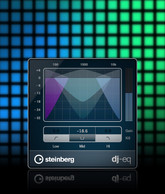
Cubase 6.5 also introduces three new effects: DJ-EQ, MorphFilter and VST AMP RACK 1.5. DJ-EQ as the title tells itself is specially designed to create a favourite performance effect for DJs. The effect is quite useful for creating unexpected twists. I also tried it and made some breaks and it did well. What is more, the parameters can be automated so that you get all the dance floor atmosphere through Cubase’s quick controls which is renowned for being so user-friendly.
Unfortunately I did not have enough time to test MorphFilter’s abilities fully. However one thing is clear: Steinberg tried its best to create superior filter types of HALion 4. I think I’ll be using more of MorpFilter soon.
 I did try out and fell in love with VST AMP RACK! I got such insane tones for my guitar. The feeling of playing with signature tones of world renown guitarists from famous bands likeAccept,Meshuggah, Emperor. It’s just wonderful! The VST comes with maximizer and limiter, so that your guitar soundwill be cut through the mix.
I just can not ignore the new way of warping offered by Cubase 6.5. The hitpoints are fused and warp quantizing is directly embeded into the Quantizing Panel which is specially dedicated for this use. The result of this is that entire arrangments just like single audio loopsneed just a mouse click for quantizing – like MIDI parts. .. and yes! your audio events are warped not – sliced which means that they followautomatically any global pitch or tempo changes of your project. This makes arrangements quite easy since audio events remain uncluttered.
The new version of Cubase also comes with some unexpected surprises. The most important of these is the ability to link your Cubase to your SoundCloud account. This gives you possibility share your songs directly with the world. The uploader is built-in the Cubase 6.5.
Linking with SoundCloud is not just for easy sharing. It made possible for Cubase 6.5 to include lossless FLAC audio compression codec. You save up to 60% disk space when recording tracks in real time.
What is more, Cubase 6.5 is the first version of Cubase to offer an interface in Simplified Chinese!

BFD 2 Review - Recording Drums by Music Recording Software on Blogspot


Recently I overlooked the posts on my blog and surprisingly discovered that I have not posted about BFD 2 yet. I thought that this completely amazing music recording software really deserves a post from me.


So what is BFD 2: it is an acoustic drum production environment. Well you may have used software like EZDrummer, Addictive Drums, Native Instruments’ Abbey Road Drum Studio etc. BFD 2 does the same as the softwares I mentioned above. However it is my favourite one for its unprecedented power and flexibility, its sound quality and extreme realism. Most of the Drum Production Environment Software are user-friendly but they have much less features than BFD 2 and it is easier for a software to be user-friendly if it has less features. I use BFD 2 as an integrated plug-in with Ableton, however it may be used with any digital audio workstation like Cubase, Sonar, Nuendo etc. At our Youtube channel you may see some video tutorials and samples, so that you can see and hear what you can do with BFD 2. Below I will write in more details about its possibilities.

BFD 2 comes with 55 GB sample library recorded at famous Air Studios in London. The components of drum kits have up to 96 levels of velocity layers. BFD 2 comes with several already set-up ready to use drum kits, however you are able to set up 10, 18 or 32 piece kits using any available drum kit components.

BFD 2 comes with about 5000 stylistically different patterns. These are MIDI files that are very likely to fit your needs and provide with the groove your musical track needs. However BFD 2’s Groove Editing is just another great thing I love in this software. BFD 2 lets you make your own grooves. It’s easy, editing and creating is intuitive and you get realistic results. You can easily assign velocity to just any MIDI tone, so that at the end you can’t tell whether it is recorded live with the drummer playing real drum-kits or recorded with BFD 2.

Samples at Air Studio have been recorded using different sets of mics. So BFD 2 lets you control the recording fully just if you were recording it live. You may choose to move your virtual recording mics close to the virtual drum-kit, move away or hang them above it. If you are more professional you may go to a bit more complicated mixing process and use BFD 2’s ability to let you mix each mic channel individually. BFD 2’s built-in processors have flanger, ring mod, delay, different kinds of filters and distortion and other effects to create even more realistic drum tracks.

BFD 2’s built-in mixer has many advantages and I may dare to say that it is better than many expensive full-fledged sequencing hosts’ mixers. However Ableton, Cubase, Sonar and Nuendo are not among such music recording software.

BFD 2 offers a free trial. One wonderful thing about it is that it never ends. However several important functions can’t be used including using BFD 2 as a plug-in and Saving, Importing or Exporting anything to or from the software. But if you need to play live at home and are in need of quality drum parts, DEMO version should work. You can visit Fxpansion’s web-site and get BFD 2’s DEMO version. Here you can listen to the separate components of drum kit – samples recordedat different velocities.


Skanner Review by Music Recording Software on Blogspot (SKANNER is Free)


Native Instruments decided to make a holiday gift for musicians and released SKANNER which is a free virtual synthesizer. Stephan Schmitt is the creator of SKANNER. Those who do not already know, Stephan Schmitt is the father of REAKTOR perhaps the most well-known and powerful virtual synthesizer available. SKANNER, which is based on unique synthesis architecture, can be used with the free REAKTOR 5 PLAYER. So that it is Really Free.


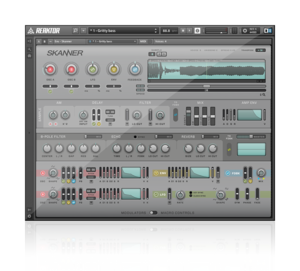
I have just had my first touch with SKANNER. I’d say it is wonderful especially for its price (0). Although there is quite complicated synthesis mechanism built in the software, it is very convenient and user-friendly, so that amateur musicians can use it as well as professionals. In fact it has two interfaces: Panel A – which displays just four macro controls so that you can control the synth easily by just being in touch with those controls. It should be mentioned that each control is interlinked with multiple internal parameters, so even a subtle tweak can have great impact on the final sound you get. Panel B – is more complicated version of the interface as it is for professionals – for those who want to dig deeper into the SKANNER’s architecture. You can see this interface in details on the picture. You can even use your own samples and get them Skanned. 


 In fact SKANNER is a wonderful mix of a synthesizer and a sampler. It comes with two oscillators which are used to scan (or SKAN) a sample. At higher frequencies you get oscillators being shaped by the sample waveform as the dominant force while at low frequencies you get scratch sound produced from the sample being read back and forth. What you get are the sounds dirty and raw and highly unpredictable. 


Versatile Preset Morpher is another thing in the creative arsenal of SKANNER. You can get unique and unusual sounds by morphing between eight different snapshots. There are controls for LFO modulation and speed of morphing. 


You Can Listen To Some DEMO TRACKS Created by SKANNER By Visiting Our YOUTUBE Channel: http://www.youtube.com/user/MusicRecordingSoftwa

iMASCHINE REVIEW by Music Recording Software on Blogspot


Yesterday I had a wonderful opportunity to try out iMaschine – Native Instruments innovative App for iPhone®, iPad® and iPod Thouch®. When I heard Native Instruments’ announcement about this App I thought that playing music using iPod Touch® screen would not be convenient. But yesterday I got sure that I was not right. iMaschine is a wonderful, user-friendly, intuitive sketchpad for beats. iMaschine is fully based on the studio concept of MASCHINE’s groove production. 

I have frequently had times when I am out of the reach of my studio and an idea about new musical track comes to my mind. Unfortunately most of such ideas got lost. But now musicians can make the sketches in the way painters do. iMaschine is for developing song ideas wherever and whenever you would like. iMaschine makes you able to jam a melody on the keyboard, record drums on the 16 pads, sing and record with the built-in audio recorder. You may also create your unique sample banks from any source. As soon as you finish you can export your musical sketches to the full version of either Maschine Mikro or Maschine and finalize your track there. You may also share your track with your friends by uploading it directly to SoundCloud.

Native Instruments designed iMASCHINE to fit the needs of the beat producers of any level and experiencee. Although it is a professional instruments, you do not have to be professional to use it. Native Instruments keeps trying its best to create professional instruments that are usable both for professionals and amateurs alike. You do not need to have any experience with MASCHINE to use iMASCHINE. Its several features including note repeat, on board mixer with six handy effects, threshold-based pad sampling that is extremely intuitive, unique audio recording function and auto loop length make you able to create grooves instantly just whenever you like it.
iMaschine comes with 25 kits, 10 projects and more than 400 individual samples of more than 100 MB and it is unbelievably cheap! You can get it for just 4.99$! 

Damage By Heavyocity Review by Music Recording Software on Blogspot


I was surfing the net when I came across with an incredibly interesting upcoming release by Native Instruments. I’ve been looking for something like this for a quite a bit of time. Aggressive, thrilling, threatening, dark.. breathtaking DAMAGE – a cinematic percussion with epic edge. I have seen the trailer and listened to the sample recordings by Native Instruments and I am very excited – waiting forward to the 1st of November when Damage by Heavyocity will be available for purchase.

To me DAMAGE seems like an ultimate source of all the jaw-dropping cinematic damage sounds I have ever heard. Visit Music Recording Software on Blogspot’s Youtube Channel To View the TRAILER. The exclusive sound samples express all of the tense atmosphere you can create by damage.  I was listening to the samples and thousands of ideas came to my mind how I could make soundtracks for my favourite sci-fi pieces of George Orwell and Aldous Huxley with the DAMAGE by HEAVYOCITY.

Native Instruments states that DAMAGE offers 30 GB of breathtaking mix of electric and acoustic sounds. You get all the fusing industrial sounds, drama, orchestral drums, 200 deeply sampled percussion sources provided by Percussive Kits.

Native Instruments promises that DAMAGE will be just so user-friendly as all the other latest products offered by them. DAMAGE comes with 700 beat-sliced loops. Which can be used either as menu-style loop suites or single loops that allow you detailed tweaking. DAMAGE is promising to be intuitive so that amateurs can use it just like professionals can.


I like DAMAGE for being unique in some way. This itself means that it can enhance my creativity to yet unreached levels for me. DAMAGE can be fully integrated with your digital audio workstation. DAMAGE comes with automatic tempo sync. You can also use drag-and-drop feature to simply export the MIDI data of a loop you have been working on.  

DAMAGE is also distinguished by its keyswitches that allow you to play effects and remix loops in action. You can create trailers instantly with simply using the unique “Damage Hits” feature. The “Punish” feature can then add the desired pressure.

Damage runs in the free KONTAKT 5 Player or in KONTAKT 5.

I am keenly looking forward to the 1st of November. Hopefully I have a possibility to try out the software as soon as it is released.

Reason 6 Review by Music Recording Software on Blogspot


It was back in 2007 when I had my first experience with Reason. It was version 4.0.  I remember I was just so excited when trying out Reason 6 two days ago as I was when I tried out Reason 4.0 for the first time in 2007. Reason 6 was released on the 30th of September 2011.


For those who do not know, Reason is a wonderful music recording software that combines samplers, hardware synthesizers, sequencers, signal processors and mixers. Reason’s flexibility has always been a point of admiration for me. Its components can be freely interconnected in a needed manner and you can use Reason either as a complete virtual studio for recording or as a collection of virtual instruments which can be used to play and record in other music recording software.

The first thing I noticed about Reason 6 is that it has grown much bigger. It has more features: more sounds, more effects, more abilities, more of almost everything I loved about Reason.  

Reason 6 now comes with modeled mixing console, with built-in EQ, dynamics and advanced routing. I enjoyed it much. It really gives a possibility to get studio grade quality mixing. I also tried out the “radio ready” master bus compressor to give my mixing an extra punch.

Puveriser is another new feature offered by Reason 6. I used it to test how could it put dirty distortion, crunchy compression, flexible modulation and a multimode filter in a single effect. The result I got was satisfying. I think this new feature makes Reason 6 even reacher.

The Echo – This new feature is what I loved most of all from Reason 6! In this playable performance effect the best of modern delays mixes with the organic sounds of old school tape machines and analog circuitry.  

Alligator is another new feature offered by Reason 6. It is extremely useful for amateur musicians. It can easily turn bland pads into rhythmic textures, make blockrocking breaks from boring beats and twist loops radically. It is great both for being easy to use and providing quality results.

Neptune is incredibly interesting new feature from Reason 6. Unfortunately I have not yet had enough experience with it to thoroughly evaluate its possibilities, however I like how it can turn the harmonies played on MIDI keyboard into instant backing vocals. In fact it is a pitch correction and voice synth tool. 

With Reason 6 audio recording has become even easier. This new version of Reason comes with rock solid audio recording and unlimited hard disk tracks.

Reason 6’s famous feature has always been non-destructive time stretch. This means that you can record your track at any tempo, then change the tempo and the track can fit the new tempo without damaging. It was the first feature I tried out two days ago, I wanted to see whether it has even improved or not. I found out that mostly it is the same as it has been in the previous version, but Reason 6 now has non-destructive audio transpose! That is just wonderful! You can record at first and then change the key whenever you like. It is incredibly easy! 

Reason 6’s Recording Meter lets you tune your guitar. 

The Factory Sound Bank of Reason 6 has enlarged by few thousands of new loops and patches for Reason’s Instruments. It also comes with hundreds of patches for brand new Alligator, The Echo, and Pulveriser effects.

Line 6 gutiar and bass amps continue to provide enormous quantity of interesting timbres and tones.

Reason 6 lets you easily export your songs to another music recording software. Only one click is needed to move all the separate mixer channels to individual audio stems of your music recording software. You can either move the channels with effects or without them.

You can have a look at the tutorials, overview and even more atMusicRecordingSoftware.Blogspot.Com’s Youtube Channel (click here).

Exclusively on MusicRecordingSoftware.Blogspot.Com – Get Reason 6 For An Unbelievably Cheap Price – 394.99$! This is 50$ less than elsewhere!